Dog Grooming Price List Software That Prices by Size
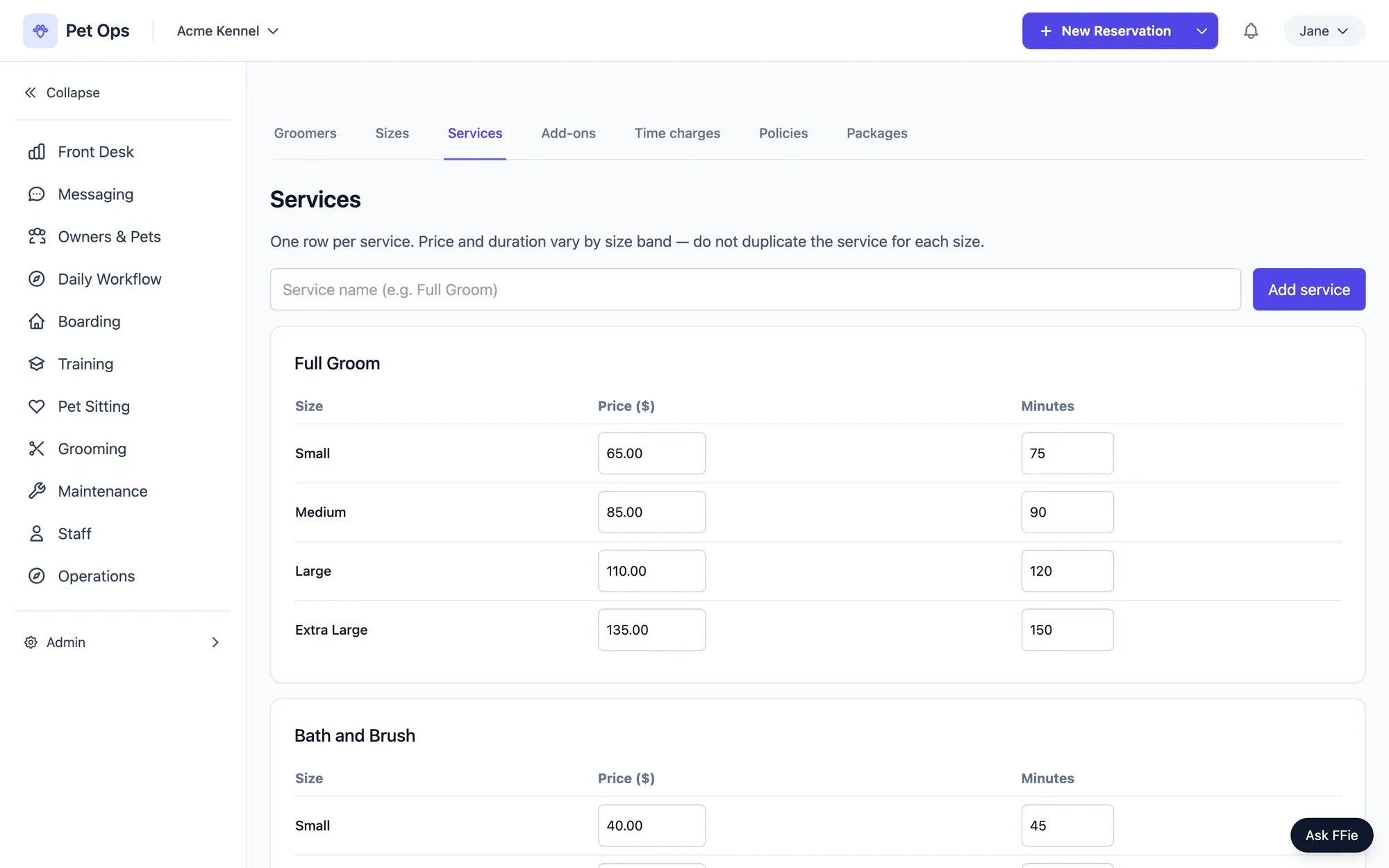
Every groomer already prices by size in their head. Pet Ops turns that into a real price list: one grid of services by size band, with its own price and duration for every cell, instead of twenty near duplicate service names.
Size Bands Are Your Own Words, Not Ours
You define your own size band set, in your own wording. Call the bands Small, Medium, Large and Extra Large, or write them the way your printed menu already reads, with weight ranges like 21 to 45 lbs where you want them.
Each service then gets its own price and its own duration for every band, in one grid. Change a price for Large and the Small row does not move. Nothing has to be copied by hand across four near identical service rows.
Flat Pricing Stays Flat
A service with no band set attached is priced once, flat. A nail trim is a nail trim, whether the dog is a chihuahua or a mastiff. You are never forced to invent size bands for a service that does not need them.
Add-ons work the same way. Teeth brushing can be one flat price for every dog, or it can scale by size band when the add-on genuinely takes longer on a bigger dog. Both options live on the same add-on row.
Quoted as an Estimate Until Drop-Off
A price booked from the size grid is treated as an estimate until the groomer actually sees the dog. Fur that is more matted than expected, or a coat that turns out bigger than the band suggested, can change the real price at drop off.
When staff re-quote an appointment, a price increase requires the owner to acknowledge the specific new amount before it is recorded. The number cannot simply creep up on the invoice without the owner having seen it and agreed to it.
Cancellation and No Show Fees Use What Was Quoted
A cancellation or no show fee is calculated against the price that was actually quoted on the appointment, not whatever the live catalog says today. If you raise your prices next month, a fee on an appointment booked last week still resolves against last week's number.
The invoice line itself is generated from your policy, never typed by a staff member at the counter. That matters because the line description is what the client reads on the card reader, and it should say the same thing every time.
Taxability, Set Once and Overridden Rarely
Taxability is a per row setting with three states: taxable, not taxable, or unset. An unset row inherits from your overall grooming tax policy, so most services never need to be touched individually. The rows that genuinely differ can be overridden on their own.
Overlapping Bands Are a Warning, Not a Wall
Real published price menus overlap sometimes. A 25 to 40 lbs band and a 35 to 50 lbs band both existing is not a data error, it is how a lot of salons actually price. Pet Ops flags the overlap so you can see it, but it never blocks you from saving bands that reflect how your business actually prices.
Commission Comes From the Same Snapshot
A groomer's commission is a percentage set on their own profile, applied to the price snapshotted on the appointment at booking. The commission report totals that same number for a date range, so what a groomer is owed traces back to the exact price each appointment actually booked at.
One Price List, Every Screen
The same price grid drives the schedule, the appointment drawer, and the invoice. A price change made once shows up everywhere it needs to, instead of living in three different places that can quietly disagree with each other.
Learn More
Price Grooming the Way You Already Quote It
Size bands in your own words, and duration that follows the dog as well as price. Included in the Pet Ops Plan alongside boarding, training and pet sitting.
Start Free